Copy formatted dates
- Oct. 6, 2017
 | Example files with this article: |
Introduction
One of the colleagues at work asked me an interesting question today. He said: "Wim, we can paste dates in Excel and we can format them whatever we want. For example, we have Paste Special in Excel. But how can we copy dates in a different format, without first changing the numberformat for the dates?" Good question, but not easy to solve ! We even need VBA for a programmatic solution, native Excel will not suffice.
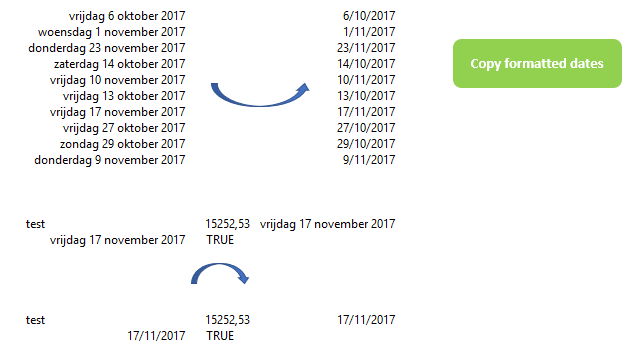
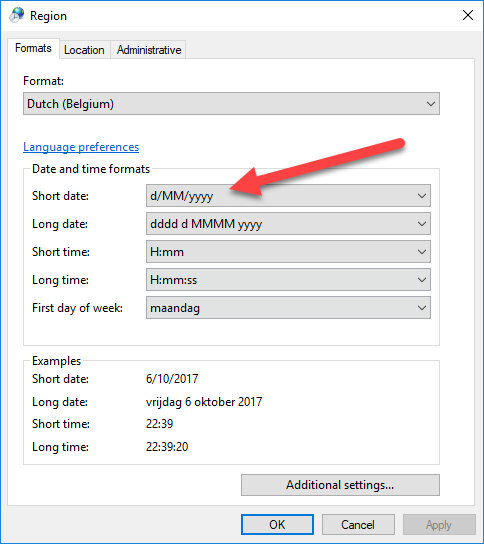
Above you can see a list of dates on the left, formatted with a popular (long) date format in Belgium. We would like to copy the dates, and paste the dates in a different format outside of Excel. The format should be the short date in the Windows regional settings:
The result would then be as on the right side of the first picture.
The code below will do this for you. You select the cells to be copied (only 1 range of cells is allowed, not multiple selections with the Ctrl key pressed). After that you launch the macro called 'Copy_formatted_dates'. If you want to copy a range of cells that contains other data types next to dates, that's fine too ! The macro does not touch these values, yet formulas will be converted to hard values, so beware of that.
A number of interesting concepts can be picked from the below code. Among other things:
- How can we empty (clear) the clipboard ?
- how can we determine the short date format from the Windows regional settings ?
- how can we bring information to the clipboard without actually doing a copy operation ?
- how can we convert an array (2D) of values to a string of text ?
Have a look at the code, it uses Windows API calls to work with the clipboard, as well as to retrieve the regional settings. I advise you to add this macro code to your Personal.xlsb macro workbook and assign a shortcut to the macro. You can read about it here. Ctrl+q seems like a good choice to me !
VBA code
Here's my code:
Declare Function GetLocaleInfo Lib "kernel32" Alias "GetLocaleInfoA" (ByVal Locale As Long, ByVal LCType As Long, _
                                                 ByVal lpLCData As String, ByVal cchData As Long) As Long

Declare Function GetUserDefaultLCID% Lib "kernel32" ()

Public Const LOCALE_SLONGDATE = &H20
Public Const LOCALE_SSHORTDATE = &H1F

Private Declare Function OpenClipboard Lib "user32.dll" (ByVal hWnd As Long) As Long
Private Declare Function EmptyClipboard Lib "user32.dll" () As Long
Private Declare Function CloseClipboard Lib "user32.dll" () As Long
Private Declare Function SetClipboardData Lib "user32.dll" (ByVal wFormat As Long, ByVal hMem As Long) As Long
Private Declare Function GlobalAlloc Lib "kernel32.dll" (ByVal wFlags As Long, ByVal dwBytes As Long) As Long
Private Declare Function GlobalLock Lib "kernel32.dll" (ByVal hMem As Long) As Long
Private Declare Function GlobalUnlock Lib "kernel32.dll" (ByVal hMem As Long) As Long
Private Declare Function GlobalSize Lib "kernel32" (ByVal hMem As Long) As Long
Private Declare Function lstrcpy Lib "kernel32.dll" Alias "lstrcpyW" (ByVal lpString1 As Long, ByVal lpString2 As Long) As Long

Public Function ClearClipboard()
' Wim Gielis
' https://www.wimgielis.com
'''''
' 10/06/2017
'''''
    OpenClipboard 0&
    EmptyClipboard
    CloseClipboard

End Function

Public Sub SetClipboard(sUniText As String)

    Dim iStrPtr As Long
    Dim iLen As Long
    Dim iLock As Long

    Const GMEM_MOVEABLE As Long = &H2
    Const GMEM_ZEROINIT As Long = &H40
    Const CF_UNICODETEXT As Long = &HD

    OpenClipboard 0&
    EmptyClipboard
    iLen = LenB(sUniText) + 2&
    iStrPtr = GlobalAlloc(GMEM_MOVEABLE Or GMEM_ZEROINIT, iLen)
    iLock = GlobalLock(iStrPtr)
    lstrcpy iLock, StrPtr(sUniText)
    GlobalUnlock iStrPtr
    SetClipboardData CF_UNICODETEXT, iStrPtr
    CloseClipboard

End Sub

Private Function Get_locale() As String

    Dim Symbol                As String
    Dim iRet1                 As Long
    Dim iRet2                 As Long
    Dim lpLCDataVar           As String
    Dim Pos                   As Integer
    Dim Locale                As Long
    Dim l                     As Long

    l = LOCALE_SSHORTDATE

    Locale = GetUserDefaultLCID()

    iRet1 = GetLocaleInfo(Locale, l, lpLCDataVar, 0)
    Symbol = String$(iRet1, 0)

    iRet2 = GetLocaleInfo(Locale, l, Symbol, iRet1)
    Pos = InStr(Symbol, Chr$(0))
    If Pos > 0 Then
        Symbol = Left$(Symbol, Pos - 1)
        Get_locale = Symbol
    End If

End Function

Sub Copy_formatted_dates()

    Dim lRows                 As Long
    Dim lColumns              As Long
    Dim sFmt                  As String
    Dim arr                   As Variant
    Dim sText                 As String
    Dim v                     As Variant

    On Error GoTo Err_End

    ' checks on the input by the user
    If TypeName(Selection) <> "Range" Then
        MsgBox "Please select a range of cells", vbInformation
        Exit Sub
    End If

    If Selection.Areas.Count > 1 Then
        MsgBox "Please select only 1 range of cells", vbInformation
        Exit Sub
    End If

    ClearClipboard

    With Selection
        lRows = .Rows.Count
        lColumns = .Columns.Count
    End With

    sFmt = Get_locale

    ReDim arr(1 To lRows, 1 To lColumns)

    If lRows * lColumns = 1 Then

        If IsDate(Selection.Value) Then
            sText = Format(Selection.Value, sFmt)
        Else
            sText = Selection.Text
        End If

    Else

        For i = 1 To lRows
            For j = 1 To lColumns
                v = Selection.Cells(i, j).Value
                If v <> vbNullString Then
                    If IsDate(v) Then
                        arr(i, j) = Format(v, sFmt)
                    Else
                        arr(i, j) = Selection.Cells(i, j).Text
                    End If
                End If
            Next
        Next

        For i = 1 To lRows
            sText = sText & vbCrLf & Join(Application.Transpose( _
                                        Application.Transpose(WorksheetFunction.Index(arr, i, 0))), vbTab)
        Next

        If Len(sText) Then
            sText = Mid(sText, Len(vbCr) + 2)
        End If

    End If

    If Len(sText) Then
        SetClipboard sText
    End If

    On Error GoTo 0

    Exit Sub

Err_End:

    MsgBox "Error " & Err.Number & " (" & Err.Description & ") in procedure Copy_formatted_dates."

End Sub
That's it, enjoy and/or adapt the ideas to solve similar problems !
